Your lead report says “booked,” but your team is still waiting to hear whether the visit happened. Keep those facts separate. A useful contractor lead report gives each inquiry a record, dates each booking and visit, and leaves later job outcomes open until someone confirms them.
That lets you check what happened without treating an inquiry, a calendar slot and a completed visit as the same result. This guide gives home-service business owners a suggested record and a weekly check. It is not a claim about results delivered by a lead provider.
Give each inquiry a record you can follow
Start with a lead ID that your team and provider can both find. Keep the original source, the time the inquiry arrived and the work requested with it. Use the same time zone throughout the report and name it.
A second message about the same request belongs in that record. If the person asks about a separate project, link the records and note why you opened another. Do not count every message as a new lead.
Keep personal contact details in your agreed business system. A shared summary can use the lead ID instead of copying a homeowner's details into every report.
| Part of the record | What to keep |
|---|---|
| Inquiry | Lead ID, source, received time and the person's requested work |
| Fit check | What your team checked, what the person said and what remains unknown |
| Booking | Visit ID, agreed time, time zone and when the booking was recorded |
| Changes | Earlier time, new time, who requested the change and when it was confirmed |
| Visit | Attendance state, when it happened and who supplied the evidence |
| Later outcome | Contractor-reported job state, its date and the source of the update |
| Follow-up | One person responsible for the next check and when they will make it |
Keep a booking separate from proof of attendance. For the difference between the events a provider might sell, read what counts in pay-per-appointment lead generation. Your agreed terms govern billing; this worksheet does not change them.
Keep contractor lead reports clear about dates
Choose the question before you total the rows.
“Which inquiries arrived this week?” starts with the received date. Follow those same inquiries forward to see their later bookings and visits. A visit next week still belongs to that inquiry's history.
“Which visits happened this week?” starts with the visit date. That list may include inquiries received last week or earlier.
Those are different views. Do not divide all visits this week by all inquiries received this week and call it the share of those inquiries that attended. The two lists may contain different people.
Label each total with its unit: unique inquiries, unique leads with a booking, or individual visits. A lead can have more than one visit. Keep repeat visits identifiable rather than silently treating them as new leads.
Also separate the time an event happened from the time someone entered the note. A Thursday update about a Wednesday visit should retain both dates.
Worked example: one inquiry, a changed time and an open outcome
This is a fictional record for a painting estimate. It is not a customer story or a ServiceConsulting result. All times below are Eastern Time. The lead and visit IDs are made up.
| Event time | Note entered | Record for lead EXAMPLE-01 |
|---|---|---|
| Nov. 2, 9:10am | Nov. 2, 9:10am | Inquiry received about an interior painting estimate. Original source retained. |
| Nov. 2, 10:00am | Nov. 2, 10:00am | Visit V-01 agreed for Nov. 3 at 2:00pm. Attendance not yet known. |
| Nov. 3, 11:00am | Nov. 3, 11:05am | Homeowner and estimator agree to move V-01 to Nov. 4 at 10:00am. Earlier slot retained as rescheduled. |
| Nov. 4, 10:00am | Nov. 5, 8:30am | Estimator reports attending V-01 and meeting the homeowner. Visit marked attended with that source. |
| Unknown | Nov. 5, 8:30am | No later job outcome supplied. Leave it unknown; estimator owns the next check. |
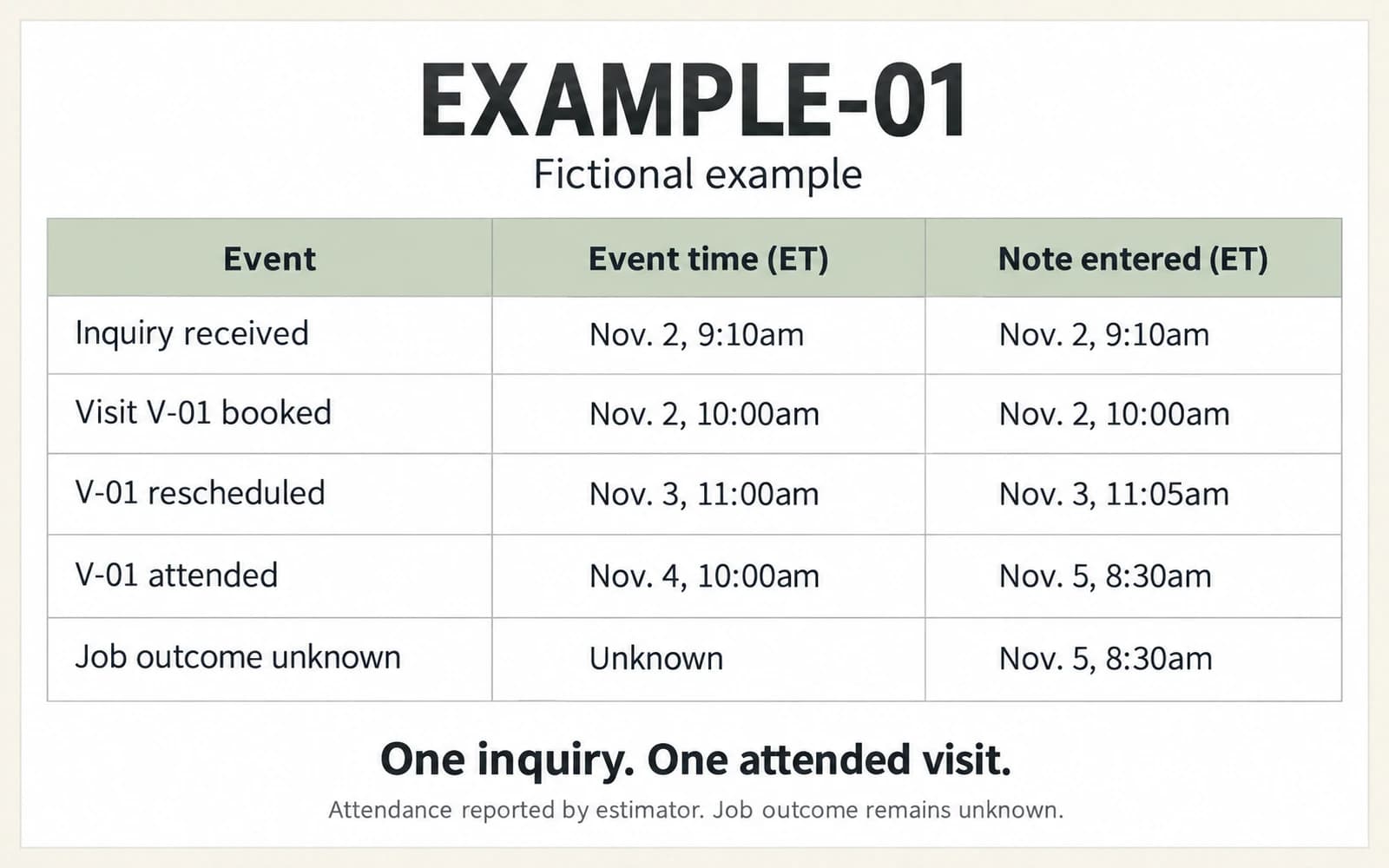
At this point, the record contains one inquiry and one attended visit. The time change is not a second lead or a second attended visit. Keep the original booking event and the reschedule in the history, even though the current visit state is attended.
The earlier slot was moved before it took place. Do not label it a missed visit just because its old calendar time passed. If a visit happens and a separate return visit is later booked, give the return visit its own linked ID.
The attendance note arrived a day after the visit. A report prepared before that note arrived should show attendance as unconfirmed. Add the new evidence to the record and date the correction; do not imply the earlier report already had it.
Leave unknown outcomes open
Missing feedback is not a lost job. A quote sent is not proof that work was accepted. A contractor's later job update is also a different event from a shown estimate.
Use plain states your team has agreed on. For example, “attendance not confirmed,” “attended, estimator reported” and “job outcome not supplied” tell the next reader what is known and where the gap sits.
Ask for the missing fact rather than filling the cell with a guess. Name who will check it. Keep the source of any later correction so the next report can explain why a count changed.
Do not present a later job outcome as proof that a provider caused it. If you are checking a provider's evidence, use the separate guide to reading lead-generation results, which explains what a result needs around it to be useful.
When two notes disagree about attendance
An unconfirmed visit and a disputed visit need different follow-up. With an unconfirmed visit, evidence is missing. With a disputed visit, the available notes disagree. Keep both sources visible instead of letting the latest entry silently replace the earlier one.
This fictional example shows a reporting check, not a customer result or a billing rule. Visit EXAMPLE-V2 has two notes: the estimator marked it attended, while the homeowner said the visit did not take place.
| Check | What to record |
|---|---|
| Identify the visit | Confirm that both notes refer to the same appointment, address and date |
| Preserve the accounts | Keep each person's statement and when it was supplied |
| Name the conflict | Mark attendance disputed while the accounts are checked |
| Assign the next check | Name the person who will ask each source what happened |
| Record the resolution | Add the supported conclusion, its source and the correction time; retain the earlier notes |
Suppose the estimator then clarifies that their attendance note belonged to a different appointment. Keep that correction with both records and return EXAMPLE-V2 to the state its own evidence supports. The mistaken note alone cannot establish that this visit happened or that it was missed.
Show unresolved disputed visits separately in your report. State how they are treated in the totals so a reader can reproduce the count. Do not quietly add them to confirmed attendance or turn the disagreement into a lost-job outcome. If the dispute affects billing, follow the agreed terms and dispute process; this reporting worksheet does not decide what is chargeable.
Run this check before you accept the weekly report
- Name the reporting dates, time zone and cutoff for updates.
- State whether you are counting inquiries received in the period or visits held in it.
- Match each counted row to a lead ID and each visit to a visit ID.
- Check repeated messages, time changes and return visits before adding totals.
- Find the evidence behind each attended state. Keep unconfirmed visits separate.
- Leave missing job feedback unknown and name the person making the next check.
- Record corrections with their dates, then share the corrected version with the people using the report.
For your next contractor lead report, pick one inquiry and trace it from the first message to the latest visit note. Agree on the missing fields with your provider before the next report is due. You will have a concrete record to compare instead of two totals with different meanings.